Bakery billing software

Bakery billing software that keeps the queue moving

Crumb is billing software made for bakery counters in India. Scan or tap the items, take cash or UPI, and hand over a GST bill before the next customer reaches the till.

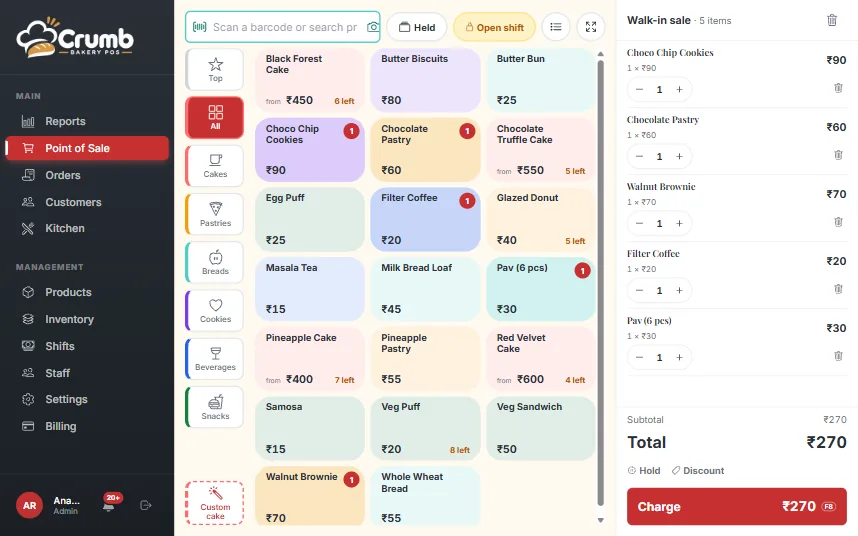
Bakery billing screen in Crumb with a ticket of items and a Charge button

Billing built for a bakery counter

A bakery sells puffs by the piece, cakes by the half kilo and custom orders by the date. General billing software treats all of that as one flat item list, so the cashier ends up typing notes and working out change on a calculator.

Crumb puts the things a bakery sells on one screen: picture cards or menu rows, a Top sellers tab, a category rail and a single box that takes a barcode scan or a search. Half-kg and 1 kg sizes are separate buttons with their own stock, so nobody edits a price by hand.

A sale in three taps

Pick the items, choose Cash or UPI, and the bill is done. For cash, type what the customer gave and Crumb shows the change. For UPI, a QR for the exact amount appears on the screen, or you can use the QR already standing on your counter.

When a customer steps aside to choose a cake, park the cart and serve the next person. Up to five carts can wait, and none of them is lost.

A proper GST bill every time

Every bill carries your GSTIN, HSN codes and the CGST and SGST split, and each item can have its own GST rate. Print it on a 58 mm or 80 mm thermal printer, or send it to the customer on WhatsApp with a pay link when money is still pending.

Composition and unregistered shops get a bill of supply instead of a tax invoice, so the paper matches how the shop is registered.

The drawer adds up at closing

Each shift opens with a float and records every cash sale, cash-out and expense. At closing, the cashier counts the notes and Crumb shows whether the drawer is short or over, with a Z-report the owner can review and sign off.


What you get

The features behind it

Fast billing at the counter

A walk-in sale takes three taps or fewer. The till is built for a queue, not a demo.

  • Cash or UPI in three taps, with keyboard shortcuts for the desk
  • Change calculator: enter the cash tendered, see the change due
  • Park up to 5 carts and serve the next customer without losing one
  • Discount in ₹ or %, with a cashier limit you set
  • One scan or search box, plus camera or USB barcode scanning
  • Menu rows or picture cards, a Top sellers tab and a category rail
  • Half-kg and 1 kg sizes with stock tracked per size
  • Fullscreen focus mode for tablets and a sticky cart bar on phones

Payments and GST invoices

Built for how India pays: UPI everywhere, GST on every bill.

  • UPI QR for any amount at the till, at checkout and at hand-over
  • Use your own counter QR instead, if you prefer
  • Public pay link that opens the UPI app on a phone and shows a QR on a PC
  • WhatsApp bills and reminders carry the pay link when money is pending
  • GST tax invoice with CGST and SGST split, GSTIN, HSN and amount in words
  • Different GST rates per item, with prices inclusive or exclusive of tax
  • Regular, composition or unregistered shops: tax invoice or bill of supply
  • Business bills with the buyer’s GSTIN, and invoice numbers that restart each financial year
  • Prints on 58 mm and 80 mm thermal paper

Cash drawer and shifts

Know exactly what is in the drawer, and who is accountable for it.

  • Open a shift with a float and record cash in, cash out and expenses
  • Close with a note count; a note is required when the count does not match
  • Z-report as PDF
  • Owner review and sign-off on every shift

See every feature

FAQ

Questions, answered

Do I need a computer and a printer to start billing?

No. Crumb runs in the browser on a phone, tablet or PC you already own. A thermal printer and a barcode scanner are optional, and bills can go on WhatsApp instead of paper.

Can I give a discount on a bill?

Yes, in rupees or as a percentage. The owner sets a limit for cashiers, and the limit is enforced by the system, not just hidden on the screen.

Does it work without internet?

No. Crumb needs an internet connection to save a bill. It shows a clear "No connection" banner when the line drops, so nobody thinks a sale was saved when it was not.

Can one bill hold a cake order and shelf items together?

Yes. A custom cake with an advance and a few items off the shelf go on the same bill, with the balance tracked until hand-over.

See Crumb on your counter

Leave your number and we will show you a live demo. Free, with no obligation.

We only use your details to contact you about Crumb.

Ready to run a calmer bakery?

See Crumb on your own counter. Free demo, no obligation.