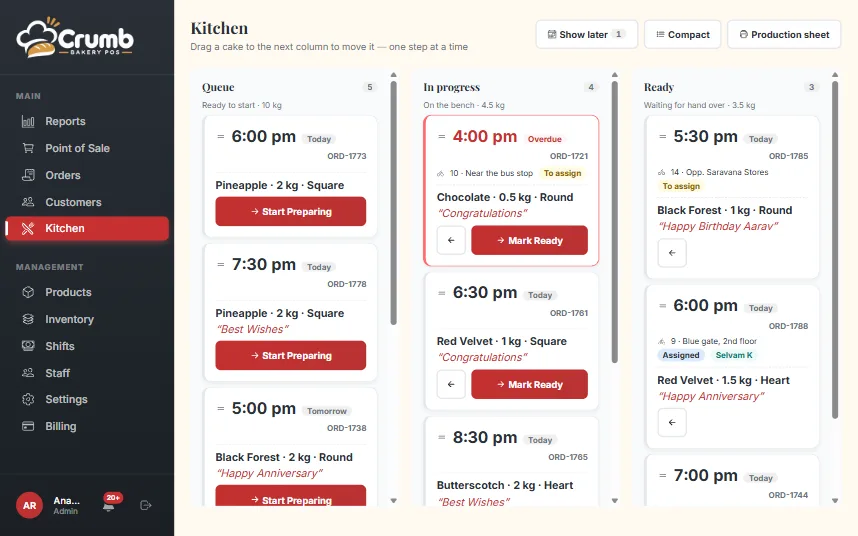
Queue, In progress, Ready
Every cake order from the counter appears on the kitchen board. The baker drags it from Queue to In progress to Ready, and the front desk sees the change at once.
Urgency pills show what is due first, and an undo bar catches an accidental move. On a phone the three columns become tabs, and a compact mode fits more orders on a wall tablet.
The full instruction, not a summary
Each order carries the weight, flavour, shape, the message for the cake, the design note, the reference photo and the cashier’s voice note. The baker hears the request the way the customer said it.
A production sheet for the morning
Print a production sheet for the day and pin it up. It lists what has to be made, so the kitchen can plan batches before the first order is due.
The sheet and the board show the same orders. A kitchen that prefers paper can work from the sheet, and the front desk still sees progress when someone moves the cards.
Bakers see only what they need
A baker’s login opens on the kitchen board. It shows no prices, no payments and no reports. The owner decides who is a baker, a cashier or a rider, and each role gets its own home screen.
Bakers can turn on alerts for new cake orders and for what is due, each on their own phone.