

GST billing for bakeries

GST billing software for bakeries, with a rate for every item

A bakery shelf rarely sits under one GST rate. Crumb taxes each item at its own rate, prints a correct invoice and gives your accountant a GST report at the end of the month.

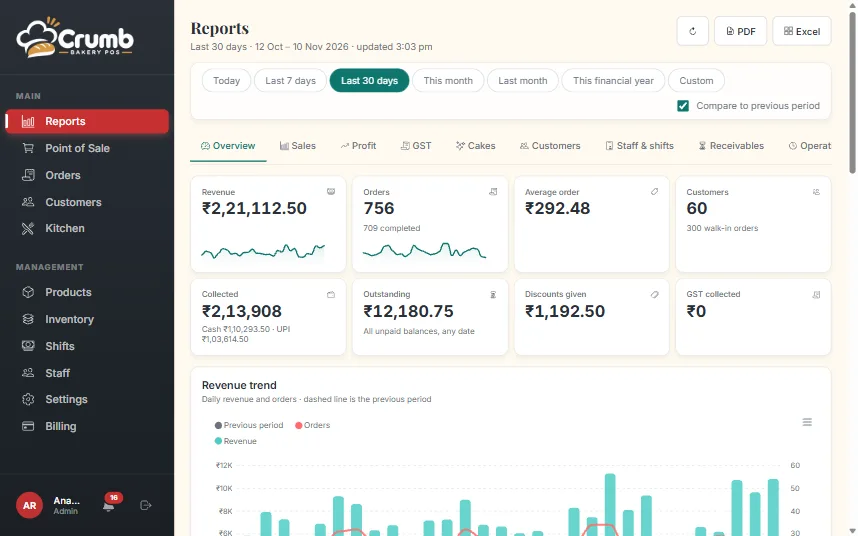
Reports in Crumb with revenue, orders and a trend chart

Different GST rates on one bill

Bread, cakes, savouries and packaged goods can fall under different GST rates. Set the rate and HSN code on a category or on a single product, and Crumb works out the tax line by line when they are billed together.

Prices can be entered inclusive or exclusive of tax, so a shelf price of ₹50 stays ₹50 at the till while the invoice still shows the right taxable value.

The right document for how you are registered

A regular GST shop prints a tax invoice with the CGST and SGST split, GSTIN, HSN and the amount in words. A composition or unregistered shop prints a bill of supply. You choose the scheme once in Settings.

For a business customer, add the buyer’s GSTIN and the bill carries it. Invoice numbers follow a series that restarts each financial year.

A GST report your accountant can use

The GST report totals taxable value and tax by rate for any date range, with PDF and Excel export. Cancelled and refunded bills are reversed with credit notes instead of being quietly deleted.

Once a month is filed, lock it. Bills in a locked month cannot be changed, so the books stay the same as the return.

Tax rates are your call

Crumb does not decide which rate applies to your products. Your accountant tells you the rates, you enter them once, and the software applies them the same way on every bill.

What you get

The features behind it

Payments and GST invoices

Built for how India pays: UPI everywhere, GST on every bill.

  • UPI QR for any amount at the till, at checkout and at hand-over
  • Use your own counter QR instead, if you prefer
  • Public pay link that opens the UPI app on a phone and shows a QR on a PC
  • WhatsApp bills and reminders carry the pay link when money is pending
  • GST tax invoice with CGST and SGST split, GSTIN, HSN and amount in words
  • Different GST rates per item, with prices inclusive or exclusive of tax
  • Regular, composition or unregistered shops: tax invoice or bill of supply
  • Business bills with the buyer’s GSTIN, and invoice numbers that restart each financial year
  • Prints on 58 mm and 80 mm thermal paper

Staff and security

Everyone sees what they need and nothing more.

  • Four roles: admin, cashier, baker and rider, each with its own home screen
  • Cost price is visible to the owner only
  • Discount limits enforced in the database, not just on screen
  • Audit log of order edits and cancellations
  • Credit notes for cancelled and refunded bills
  • Lock a filed month so its bills cannot change
  • Each shop’s data is kept separate from every other shop

See every feature

FAQ

Questions, answered

Does Crumb file my GST return?

No. Crumb produces the invoices and the GST report with the totals by rate. You or your accountant file the return on the GST portal.

Can I charge GST on the delivery charge?

Yes. There is a setting for whether delivery is taxed, and the delivery tax shows on the invoice and in the GST report.

I am under the composition scheme. Can I still use it?

Yes. Choose the composition scheme in Settings and Crumb prints a bill of supply without a tax split.

Can I print my FSSAI number on the bill?

Yes. Enter your 14-digit FSSAI number in Settings and it prints on every receipt.

See Crumb on your counter

Leave your number and we will show you a live demo. Free, with no obligation.

We only use your details to contact you about Crumb.

Ready to run a calmer bakery?

See Crumb on your own counter. Free demo, no obligation.