

Bakery delivery management

Bakery delivery software with a rider app and cash settlement

Delivering a cake is the easy part. Knowing which rider has it, whether it arrived and where the cash went is the hard part. Crumb handles delivery inside the same system that took the order.

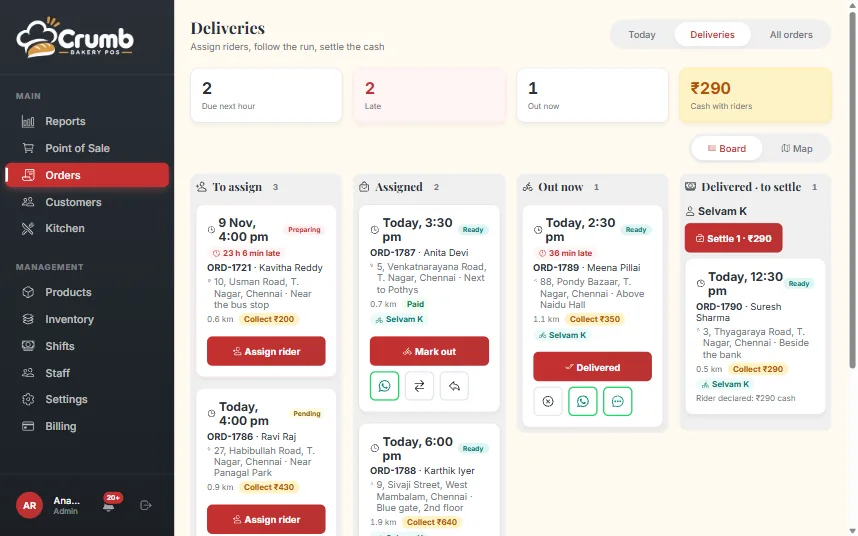
Deliveries board in Crumb with To assign, Assigned, Out now and Delivered columns

A delivery charge that prices itself

Set a flat charge or distance slabs from your shop, with free delivery above an order value if you want it. Crumb suggests the charge when the address is pinned, and the cashier can still type a custom amount for a special case.

The right door, the first time

Search the address on a map, paste the location link a customer sent on WhatsApp, or send the customer a link so they drop the pin themselves. No more calls from the rider asking which lane.

When a rider reaches the door they can save that exact spot, so the next delivery to the same customer starts from the right pin.

A board for the desk, a simple screen for the rider

The Deliveries board shows what is waiting to be assigned, assigned, out now and delivered, as lanes or on a map. Assign a rider and they get the order on their own phone with a WhatsApp message.

The rider sees only their own runs: the address, the amount to collect, and buttons to call, navigate, start and mark delivered or could not deliver. Shelf-item orders have a packing step, so a rider never leaves with an unpacked bag.

Rider cash lands in the drawer

At the end of the run, the desk records what the rider actually handed in. That cash goes into the open shift, and any shortfall stays on the customer’s dues instead of disappearing.

The Operations report shows delivery charges, on-time runs, failed runs and cash handovers per rider.

What you get

The features behind it

Home delivery and riders

Send cakes and shelf items to the door, and know where the cash is at the end of the day.

  • Delivery charge by flat rate or distance slab, free above an amount you set, or any custom charge
  • Drop the address on a map: search, paste a WhatsApp or Maps link, or use your location
  • Send the customer a link so they pin their own location
  • Deliveries board with lanes and a map, and assign a rider with a WhatsApp to them
  • Packing step for shelf-item orders, so a rider never leaves with an unpacked bag
  • Print a delivery slip with no prices, the amount to collect and a map QR
  • Rider app on the phone: today’s runs, call, navigate, Start, Delivered or Could not deliver
  • Riders save the customer’s door spot, so the next delivery starts from the right pin
  • Rider cash handed in at settlement goes to the drawer; any shortfall stays on the customer’s dues

See every feature

FAQ

Questions, answered

Do riders need to install an app?

No. A rider signs in on their phone’s browser and can add Crumb to the home screen. Nothing comes from an app store.

Can a rider see prices and other orders?

No. A rider sees only the deliveries assigned to them and the amount to collect. The delivery slip prints without item prices.

Does it connect to Swiggy or Zomato?

No. Crumb manages deliveries done by your own riders. Orders from food apps are not imported.

What if the customer is not at home?

The rider marks it "Could not deliver". The order returns to the desk, which can send it out again.

See Crumb on your counter

Leave your number and we will show you a live demo. Free, with no obligation.

We only use your details to contact you about Crumb.

Ready to run a calmer bakery?

See Crumb on your own counter. Free demo, no obligation.